

Auto-Sync Shopify Bundle Prices on Variant Price Changes
When you use the Shopify Bundles app to create product bundles, changing a component product's variant price does not automatically update the bundle product's variant price. The Product Variant Price Changed trigger from Flow Trigger Extensions solves this by detecting the price change and automatically recalculating and updating the bundle variant price.
We will assume the following scenario to understand how we can use the Product Variant Price Changed trigger to keep bundle prices in sync.
Scenario: Auto-update bundle price when a component variant price changes
Imagine you have a bundle product (e.g. a T-Shirt bundle) created with the Shopify Bundles app. The bundle contains three component products, Black T-Shirt, Grey T-Shirt, and White T-Shirt, each priced at €10.00 per variant. The bundle variant price is €30.00 (the sum of all component prices). When you change a component product's variant price, this flow will automatically update the corresponding bundle variant price.
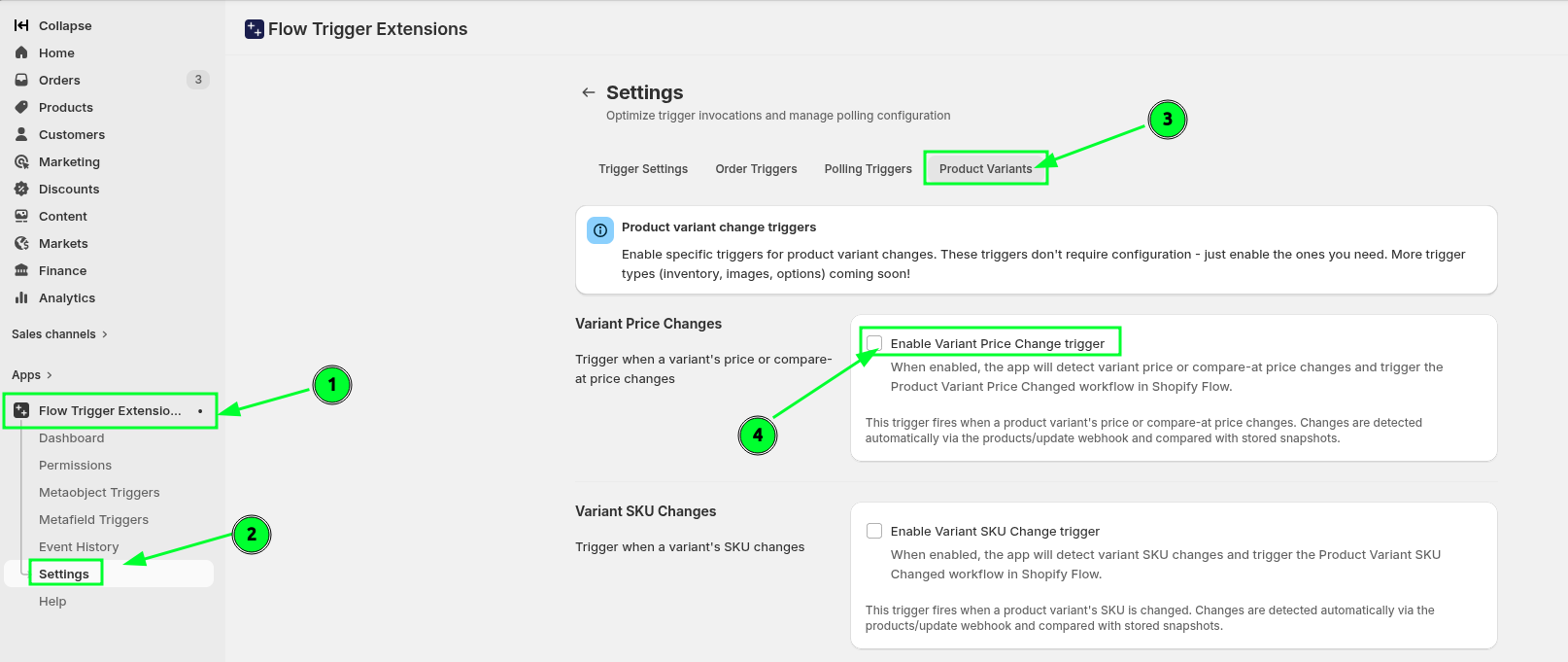
Enable this trigger from the app settings -> Product Variants -> Variant Price Changes
Product Variant Price Changed
Get the parent bundle product, calculate updated variant prices, and bulk-update the bundle variant prices via the Admin API
Video Guide
You can see the steps visually in this video as well (video has no voice, you can control the speed of the video according to your need)
How we will make this flow
Understanding the setup
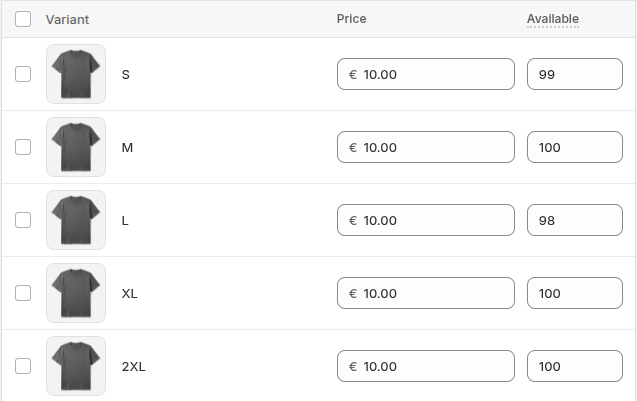
We have a component product (e.g. Grey T-Shirt) with variants S, M, L, XL, 2XL and each priced at €10.00.
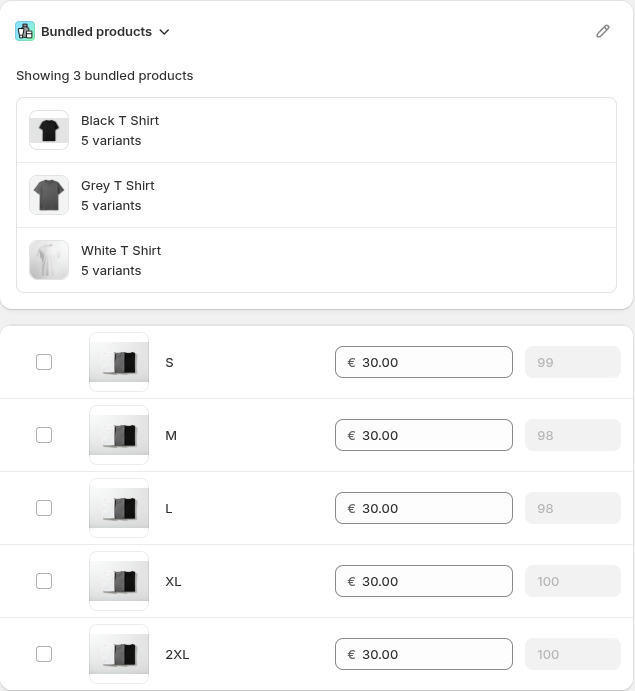
We have a bundle product created with the Shopify Bundles app. It contains 3 bundled products (Black T-Shirt, Grey T-Shirt, White T-Shirt), each with 5 variants. The bundle variant price is €30.00 (sum of component prices: 3 × €10.00).
You can see the steps followed visually here:
Enable the Variant Price Change trigger from Flow Trigger Extensions -> Settings -> Product Variants -> Variant Price Changes
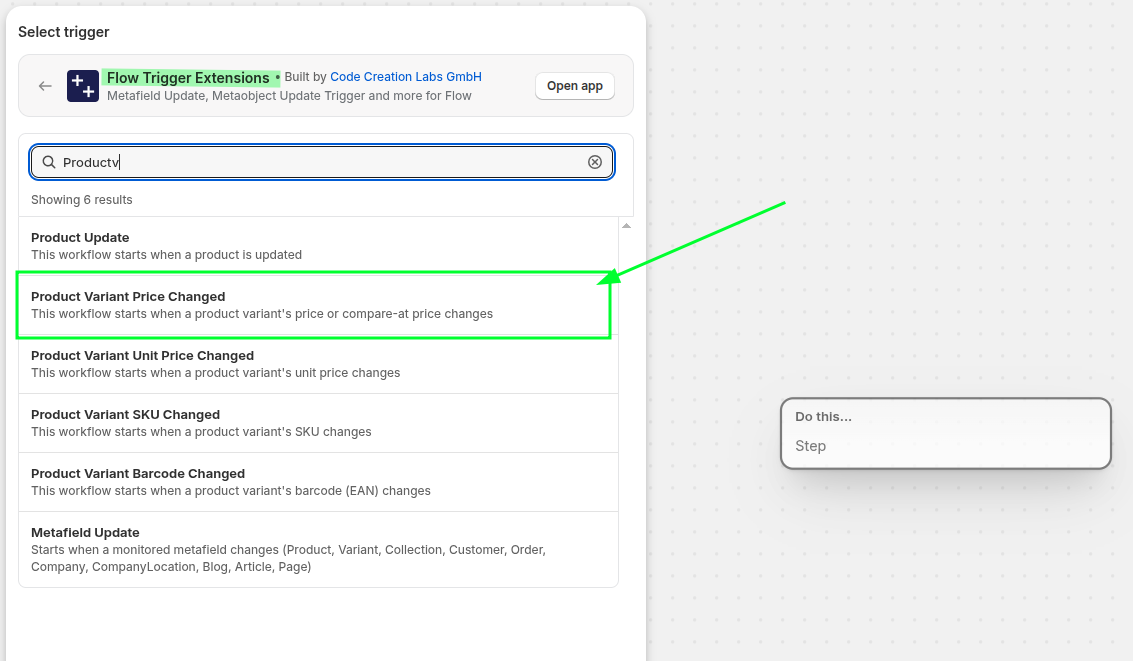
Create a new blank workflow from the Shopify Flow app and select the Product Variant Price Changed trigger from the Flow Trigger Extensions app
Add a Get product data action to retrieve the changed product using an advanced query, sorted by created at in ascending order. This step fetches the product's parent bundle information via the
productParentsfield. Query is like this:id:{{productVariant.product.id | split: "gid://shopify/Product/" | last}}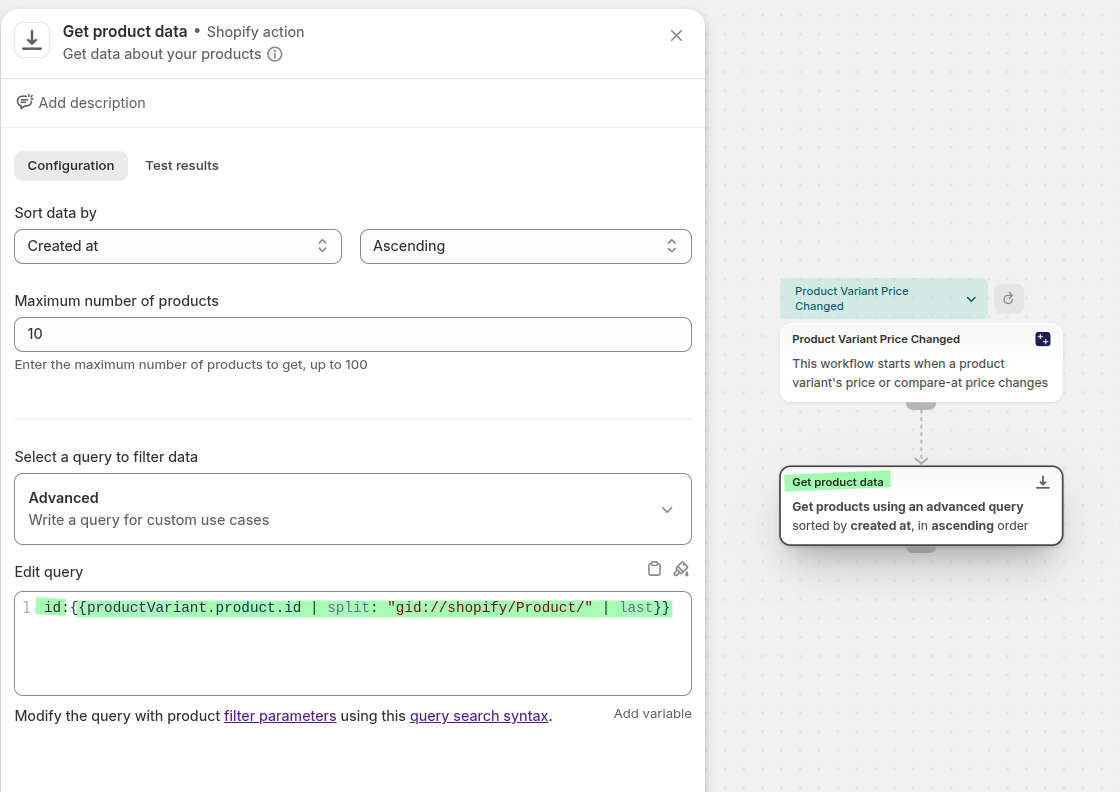
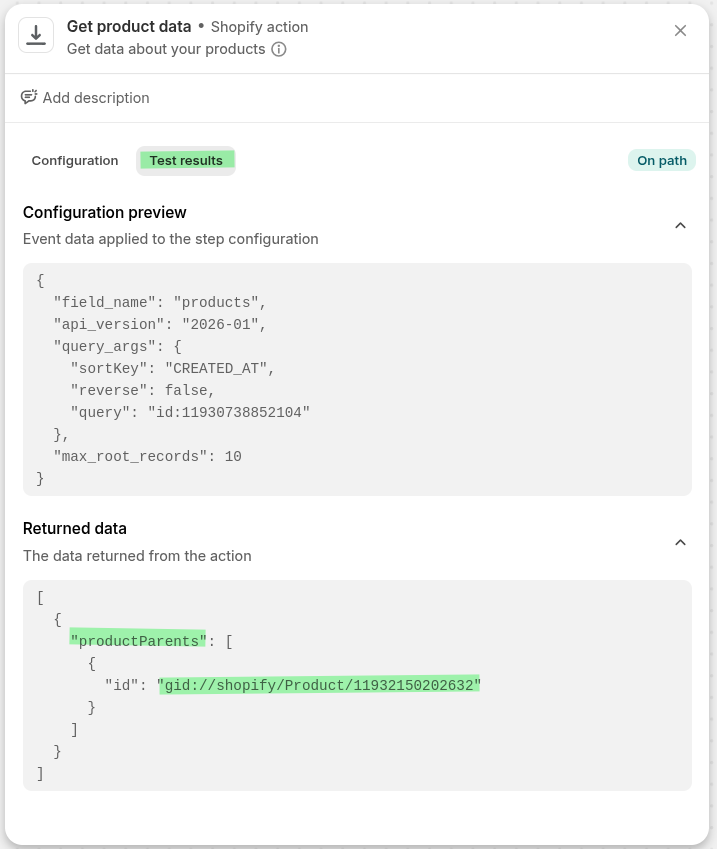
Add a Run code step to extract the parent bundle product ID from the
getProductDataresult. The code extracts the parent product IDs fromproductParentsand builds anidsConditionstring for querying.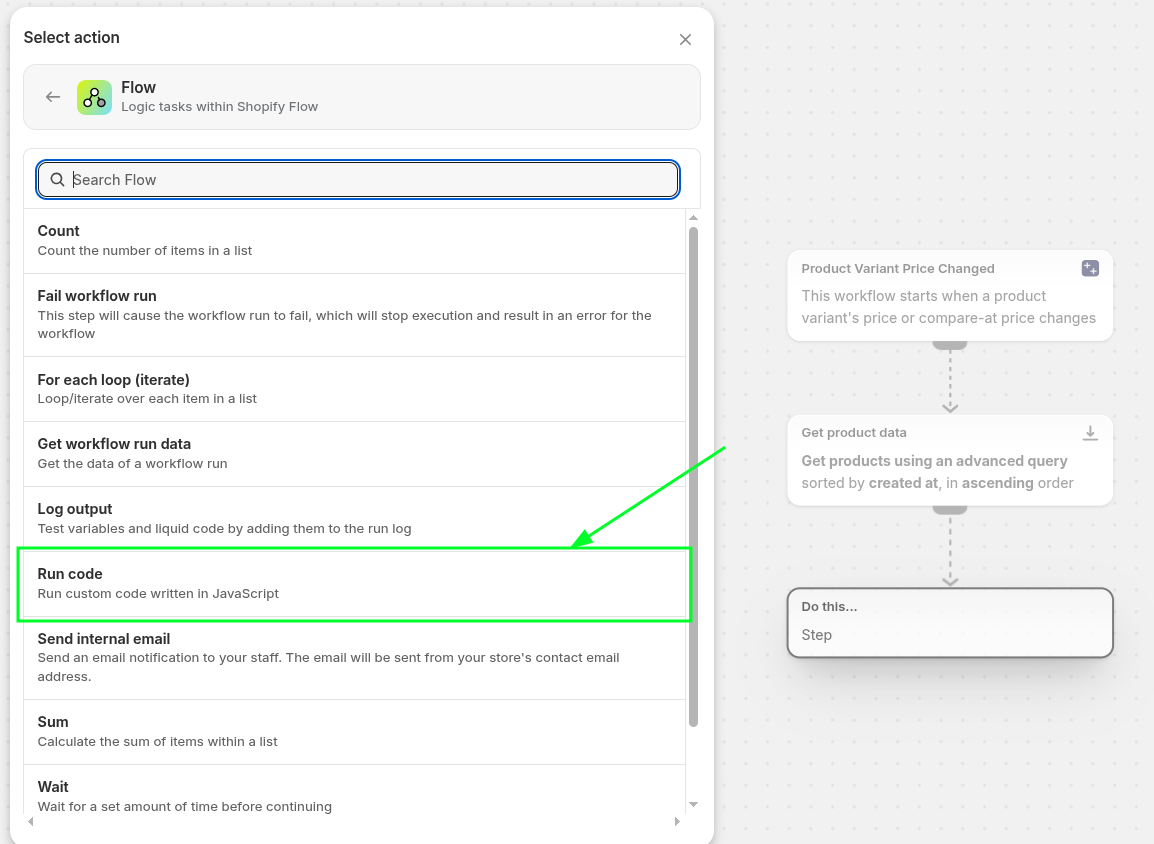
The Run code step uses the following GraphQL input, javascript code and outputs to get the parent product IDs:
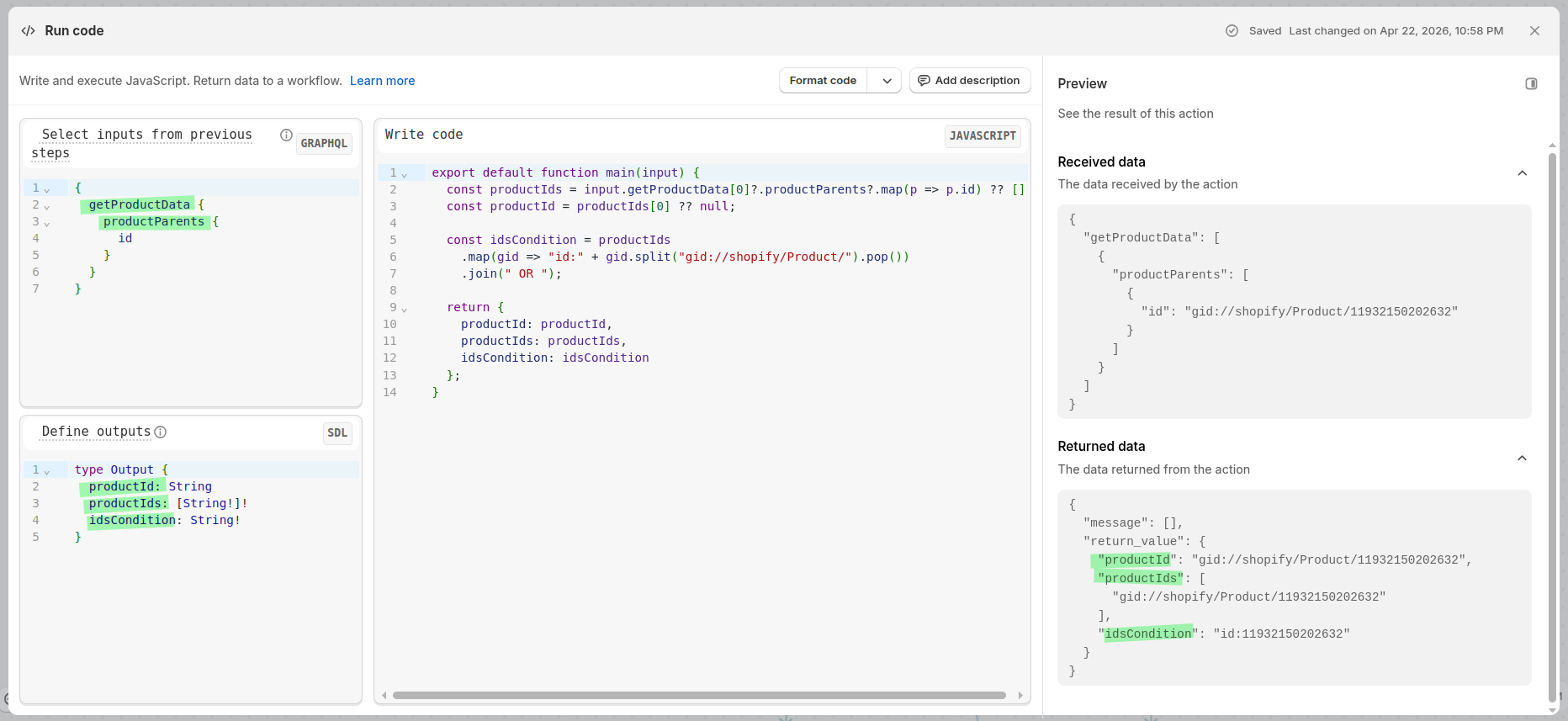
Run Code step showing the GraphQL input, JavaScript code and the preview output
{
  getProductData {
    productParents {
      id
    }
  }
}
export default function main(input) {
const productIds = input.getProductData[0]?.productParents?.map(p => p.id) ?? [];
const productId = productIds[0] ?? null;
const idsCondition = productIds
.map(gid => "id:" + gid.split("gid://shopify/Product/").pop())
.join(" OR ");
return {
productId: productId,
productIds: productIds,
idsCondition: idsCondition,
};
}type Output {
productId: String
productIds: [String!]!
idsCondition: String!
}Add a Condition step that checks whether the Run code output
productIdis not empty and exists. This ensures we only proceed when the changed product is actually part of a bundle.True → continue to update the bundle price
False → stop (the product is not a bundle component)
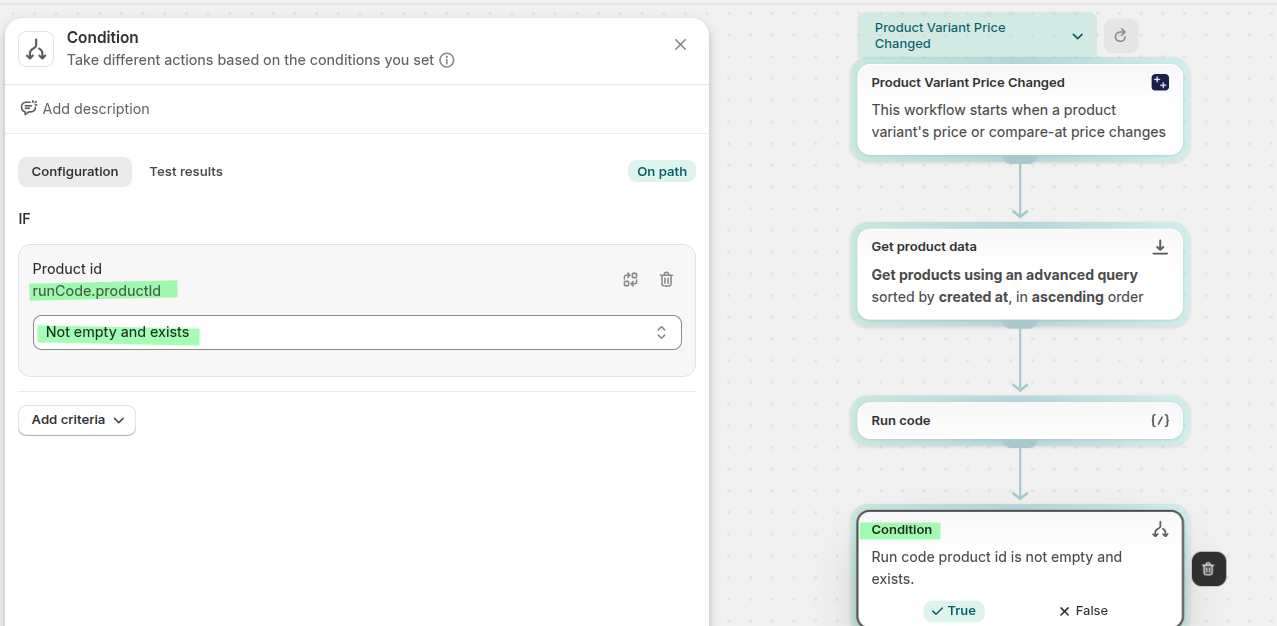
If the condition is True, add another Get product data (1) action to fetch the parent bundle product's variant and pricing data using the
idsConditionfrom the Run code step.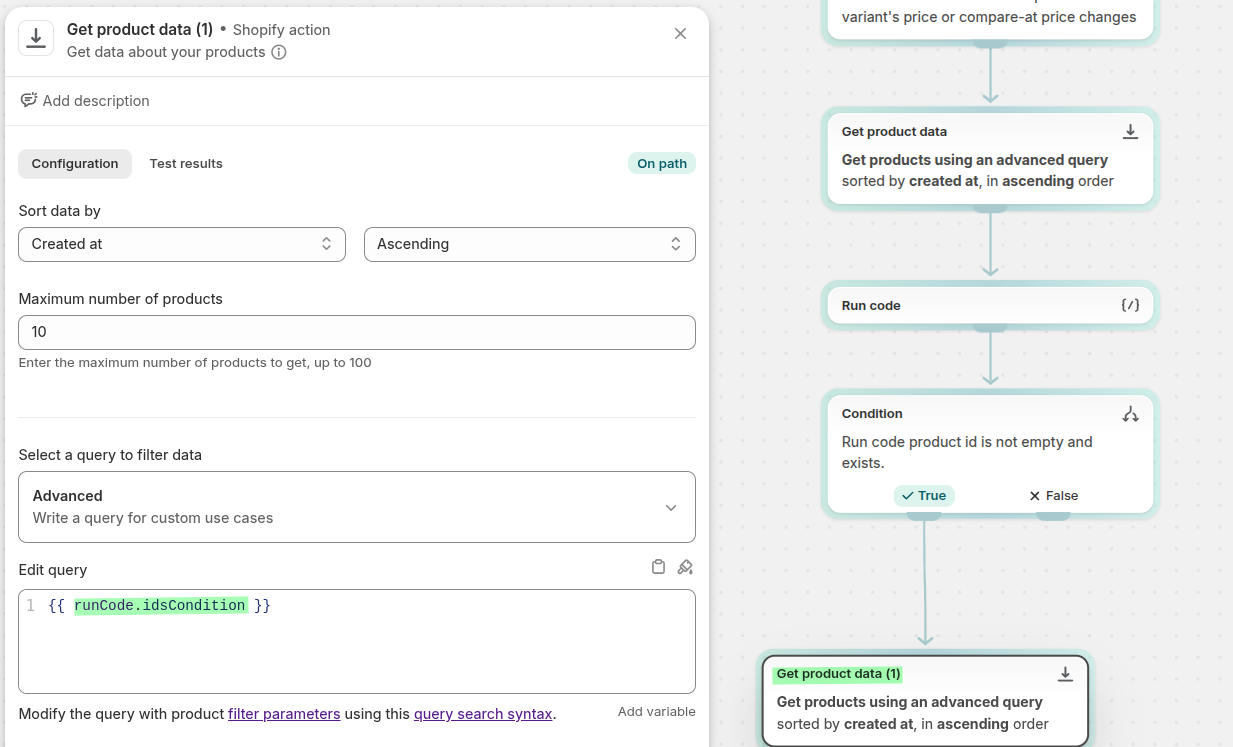
Add a second Run code (1) step to calculate the new bundle variant prices based on the updated component prices. This step outputs a
variantPricesarray with the new prices for each bundle variant.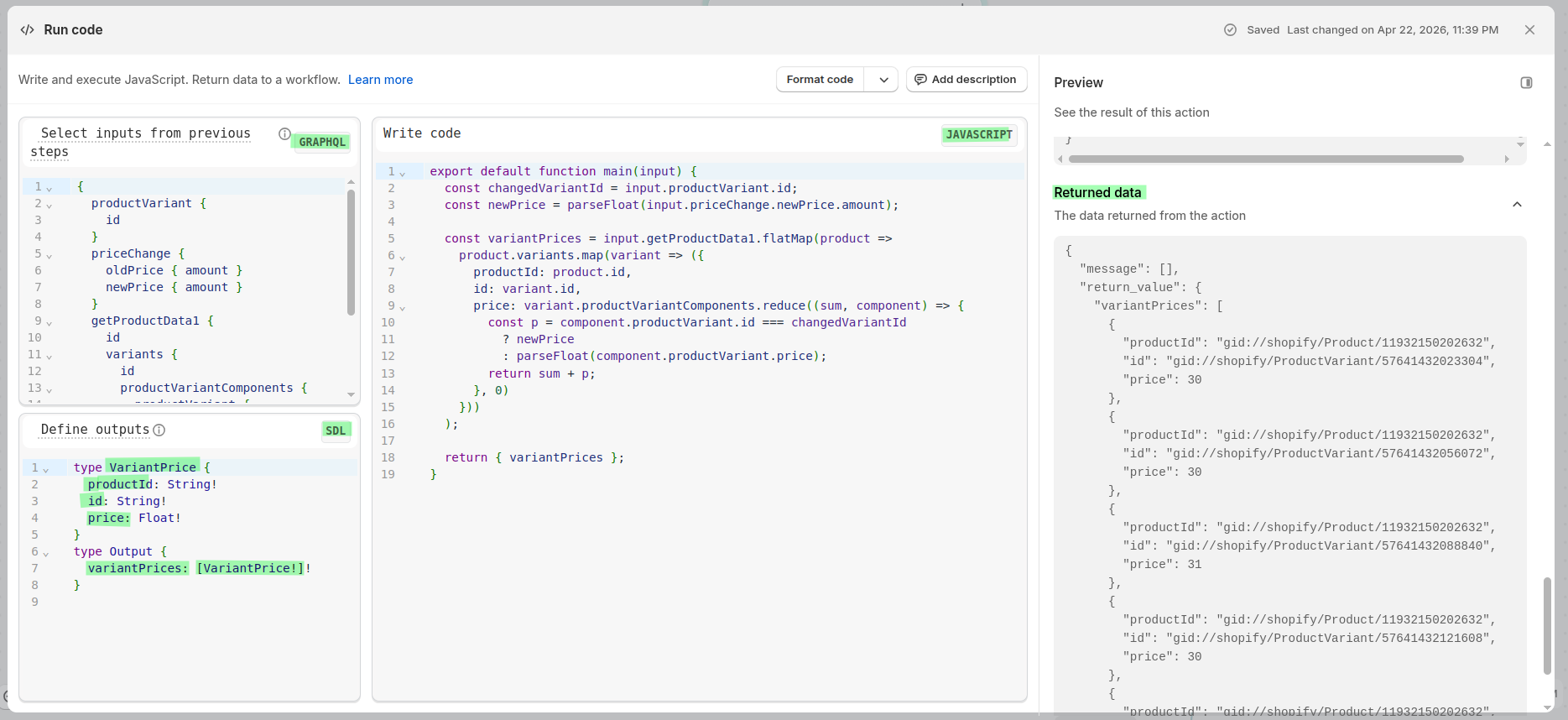
This Run code (1) step is recalculating the bundle variant prices based on the updated component price. Here's what it does:
First, it grabs two key pieces of info from the trigger:
changedVariantIdthe variant that was just changed (...158920)newPricethe new price for that variant (11.00)
Then it loops through every bundle variant and recalculates its total price. Each bundle variant has 3 component variants (Black T-Shirt, Gray T-Shirt, White T-Shirt). For each component, it checks: is this the variant that just changed? If yes, use
newPrice(11.00) instead of the stale price still stored in Shopify (10.00). If no, use the existingcomponent.productVariant.price.It sums up the component prices to get the new bundle variant price.
You can see it working in your output data. Look at variant
...088840its components include...158920(the changed variant). So its price is 11 + 10 + 10 = 31 , while all the other bundle variants still total 30 because none of their components changed.This is the key insight of the step: Shopify hasn't updated the component price in the bundle data yet, so the code can't just sum the existing prices, it has to substitute the new price for the changed variant on the fly. Without this, all variants would still show 30.
The output
variantPricesarray then feeds into the For each loop which callsproductVariantsBulkUpdateto actually write these recalculated prices back to the bundle product.
{
  productVariant {
    id
  }
  priceChange {
    oldPrice { amount }
    newPrice { amount }
  }
  getProductData1 {
    id
    variants {
      id
      productVariantComponents {
        productVariant {
          id
          price
        }
      }
    }
  }
}
export default function main(input) {
const changedVariantId = input.productVariant.id;
const newPrice = parseFloat(input.priceChange.newPrice.amount);
const variantPrices = input.getProductData1.flatMap(product =>
product.variants.map(variant => ({
productId: product.id,
id: variant.id,
price: variant.productVariantComponents.reduce((sum, component) => {
const p = component.productVariant.id === changedVariantId
? newPrice
: parseFloat(component.productVariant.price);
return sum + p;
}, 0)
}))
);
return { variantPrices };
}type VariantPrice {
productId: String!
id: String!
price: Float!
}
type Output {
variantPrices: [VariantPrice!]!
}Add a For each loop (iterate) that iterates over each item in
runCode1.variantPrices. For each variant price, it performs the Send Admin API request action using the productVariantsBulkUpdate mutation to update the bundle variant price.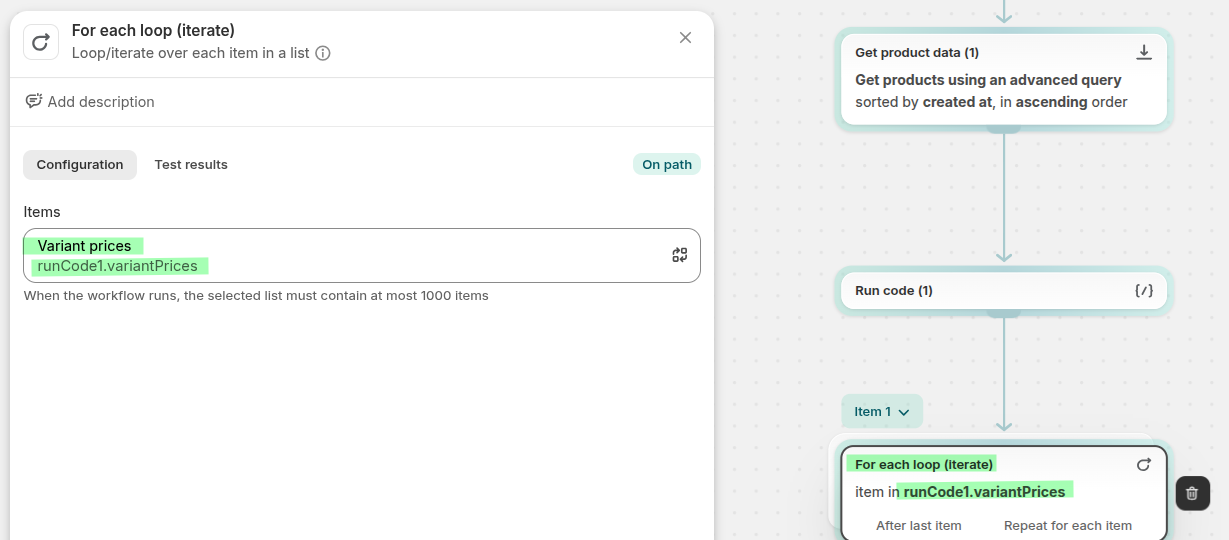
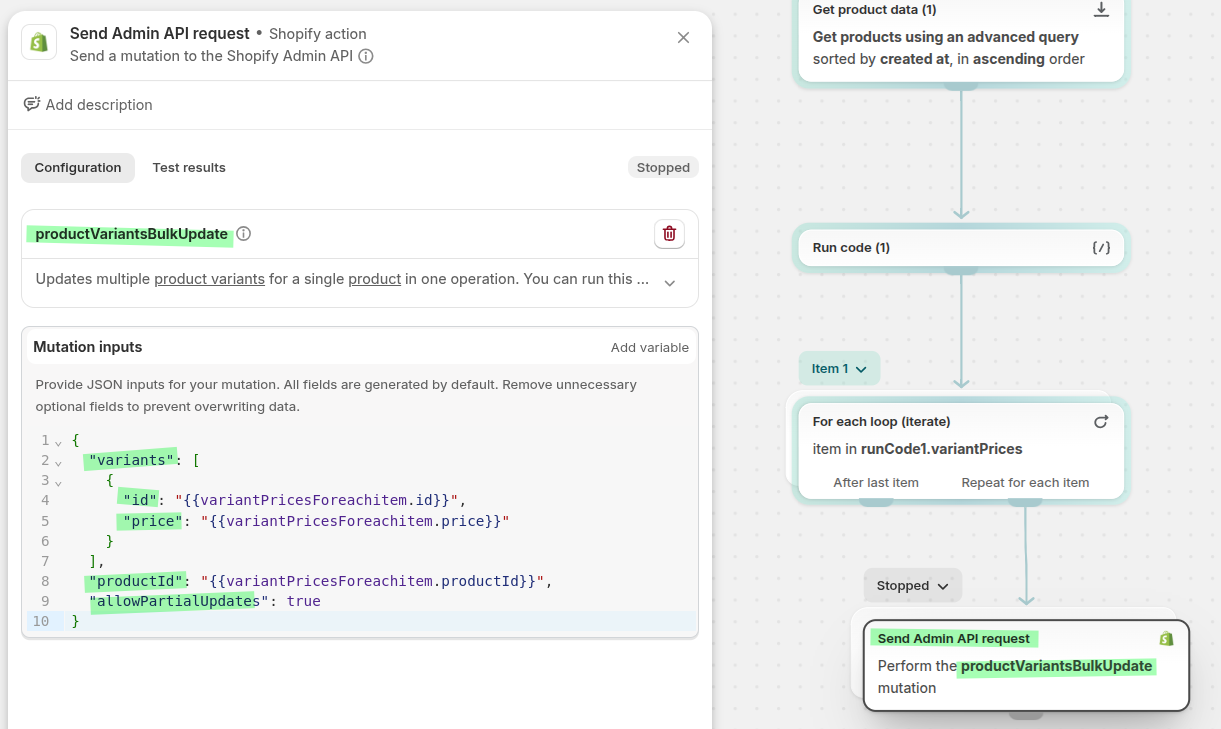
You can use this input for the Mutation:
{
  "variants": [
    {
      "id": "{{variantPricesForeachitem.id}}",
      "price": "{{variantPricesForeachitem.price}}"
    }
  ],
  "productId": "{{variantPricesForeachitem.productId}}",
  "allowPartialUpdates": true
}
How it all works together
When a variant price changes on a component product (e.g. you update the Grey T-Shirt S variant from €10.00 to €15.00):
The Product Variant Price Changed trigger fires
The flow fetches the product's parent bundle using
productParentsThe Run code step extracts the bundle product ID
The condition checks if this product is part of a bundle
If yes, it fetches the bundle product data
A second Run code step recalculates the bundle variant prices
The loop iterates over each variant and updates the bundle price via the productVariantsBulkUpdate Admin API mutation
The bundle S variant price would now update from €30.00 to €35.00 (€15.00 + €10.00 + €10.00).
Related pages
See all trigger categories available in Flow Trigger Extensions.
Learn how the Product Variant Price Changed trigger works and set up your first alert.
Learn when to use a monitored product metafield instead of a built-in product trigger.